Welcome to your complete, easy-to-understand guide on navigating land administration in Telangana! Managing land records used to involve endless physical paperwork, long queues at revenue offices, and complex online tools. To make land ownership transparent, conflict-free, and simple for every citizen, the Government of Telangana introduced the integrated Bhu Bharati portal (bhubharati.telangana.gov.in).
Operating under the statutory authority of the Telangana Bhu Bharati (Record of Rights in Land) Act, 2025 (Act No. 1 of 2025) and the Telangana Bhu Bharati Rules, 2025 (notified under G.O. Ms. No. 39 on April 14, 2025), Bhu Bharati completely replaces the legacy Dharani system. Whether you are checking your family’s inherited agricultural land, verifying a plot before paying a token deposit, or looking to file for an online mutation, this guide walks you through every step in clear, accessible terms.
What is the Bhu Bharati Portal in Telangana?
Evolution from Dharani to Bhu Bharati
To understand why Bhu Bharati was created, it helps to look at what came before it. In October 2020, the state launched the Dharani portal under the Telangana Rights in Land and Pattadar Pass Books Act, 2020. While Dharani digitised agricultural records, it suffered from severe administrative centralization. Local field officers—such as Tahsildars and Revenue Divisional Officers (RDOs)—were stripped of their power to correct basic clerical mistakes. As a result, over 6.46 lakh public grievances piled up, and private lands were frequently misclassified onto prohibited government lists without an easy administrative way to fix them. A subsequent government code audit also flagged system vulnerabilities and security lapses under private maintenance vendors.
To fix these structural flaws, Chief Minister A. Revanth Reddy appointed a five-member expert committee, headed by land laws expert M. Sunil Kumar. After studying agrarian legislations across 18 Indian states, the committee recommended repealing the 2020 law and passing Act No. 1 of 2025 to establish Bhu Bharati.
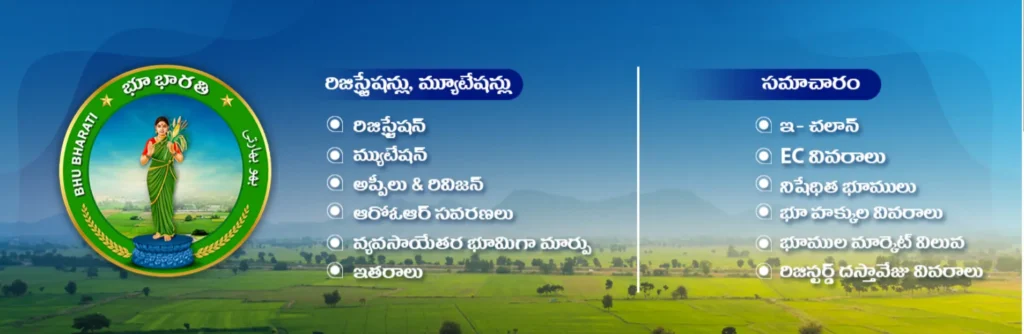
Instead of Dharani’s confusing maze of 33 to 36 separate choices, Bhu Bharati consolidates all citizen workflows into 6 clean, simplified modules:
- Registration Module: Manages sale deeds, gift deeds, partitions, mortgages, leases, and powers of attorney.
- Mutation Module: Handles legal heir succession, court order updates, and pending title mutations.
- ROR Corrections Module: Handles record rectifications, passbook updates, and Section 22A grievance reviews.
- NALA Module: Processes non-agricultural land assessment conversions.
- Appeals and Revisions Module: Provides structured, administrative appeal channels against rejected orders.
- Miscellaneous Services Module: Manages court intimations, khata merging, and legal assistance.
Historical Origins & Peer Systems
Although Bhu Bharati is Telangana’s modern portal, the name itself has deep historical roots in Indian e-governance. Back on November 5, 2006, undivided Andhra Pradesh launched a ₹34–₹35 crore pilot project named Bhu Bharati in the Bodhan mandal of Nizamabad district as the country’s first Integrated Land Information System (ILIS). Its goal was to pioneer the transition toward conclusive land titling.
Bhu Bharati also builds upon lessons learned from Karnataka’s famous Bhoomi project, which was launched in 2000 and digitised over 20 million paper Record of Rights, Tenancy and Crops (RTC/Pahani) records. However, while Bhoomi was built as a text-first database, Telangana’s modern Bhu Bharati enforces mandatory spatial-to-textual synchronization—meaning every digital ownership record is linked directly to a geo-referenced map.
Key Features & Innovations of Bhu Bharati
The Bhudhaar Unique Land Parcel Identification
One of Bhu Bharati’s biggest breakthroughs is the Bhudhaar system—a unique 11- or 12-digit parcel identification number assigned to every land holding in Telangana, functioning just like an Aadhaar card for your land.
The system issues two distinct types of Bhudhaar IDs:
- Temporary Bhudhaar: Assigned to land parcels where textual ownership records are digitised, but physical geo-referencing and ground map validation remain pending.
- Permanent Bhudhaar: Awarded only after a physical field survey validates the exact geographic coordinates, boundary shape, and plot polygon on the ground. A Permanent Bhudhaar is mandatory for executing future property registrations.
Spatial Mapping & Drone-Based Surveys
Boundary disputes (Vivat Kabja) have historically plagued rural landowners due to vague textual descriptions. Bhu Bharati resolves this by integrating high-precision technology directly into the revenue database:
- Drone Photogrammetry: Low-altitude unmanned aerial vehicles (UAVs) fly over villages to capture high-resolution imagery of field boundaries and physical ridges.
- Differential GPS (DGPS) & CORS Networks: Continuously Operating Reference Stations provide ground control points with millimeter-level accuracy.
- RTK Rover Surveys: Field surveyors use Real-Time Kinematic (RTK) rovers to mark parcel boundary vertices live on-site.
This spatial survey framework was piloted across five representative mandals: Kusumanchi (Khammam district), Aswaraopeta (Bhadradri Kothagudem district), Amangal (Rangareddy district), Vatpally (Sangareddy district), and Kosgi (Narayanpet district). In a benchmark trial at Mulugumadu village in the Madhira constituency of Khammam, survey teams mapped the entire village area, created Land Parcel Maps (LPMs), assigned Bhudhaar numbers, and distributed QR-coded digital passbooks to farmers in just 20 days.
Inter-Departmental Integration
Instead of forcing citizens to visit multiple offices, Bhu Bharati acts as a single-window portal connecting the Revenue Department, Survey, Settlement & Land Records Department, and Stamps & Registration Department. When a transaction is submitted at a Sub-Registrar’s office, the portal automatically queries the revenue database to confirm title validity, verify Section 22A prohibited list clearance, calculate market fees, and attach the required Land Parcel Map.
Bhu Bharati also integrates with broader civic and economic infrastructure:
- HYDRAA Portal Linkage: The system links with the Hyderabad Disaster Response and Assets Protection and Information Agency (HYDRAA) portal. Urban plot buyers in metropolitan Hyderabad can cross-check survey numbers against digitized maps to ensure a layout does not encroach on lake Full Tank Levels (FTL), water bodies (Shikam lands), or buffer zones.
- Telangana Rising 2047 Alignment: Spatial databases link with industrial logistics corridors and HMDA master plans to support commercial due diligence.
How to Check Telangana Land Records Online
Step-by-Step Land Details Search
You do not need to visit a Mandal Revenue Office just to inspect your land records. Anyone can perform a free online search by following these quick steps:
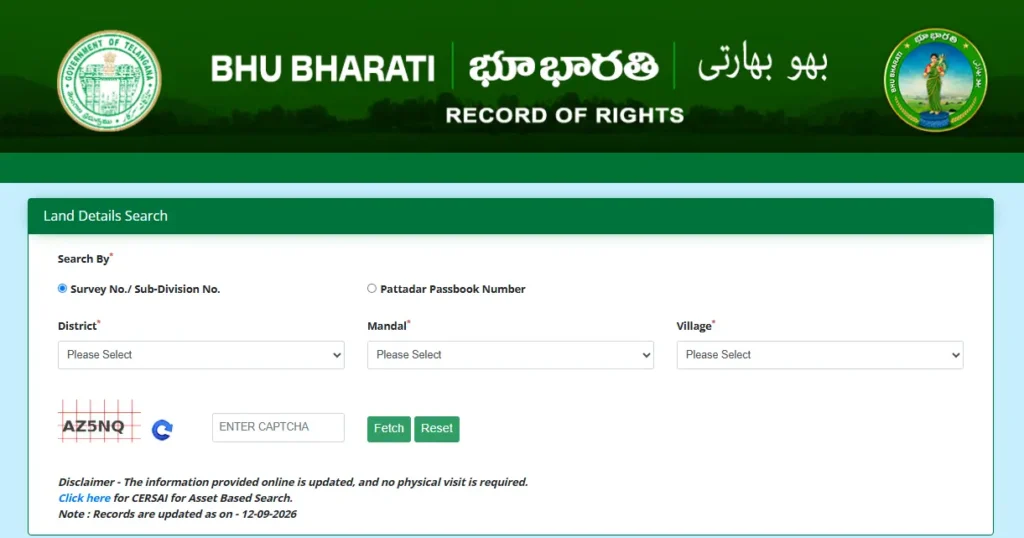
- Visit the Official Portal: Go to
bhubharati.telangana.gov.in. - Open Information Services: Click on Information Services from the top menu and select Land Details Search (or “Know Your Land Status”).
- Choose Your Location: Select your District, Mandal, and Revenue Village from the dropdown menus.
- Enter Your Parcel Identifier: Search using any one of these specific identifiers:
- Survey Number / Sub-Division Number
- Khata Number
- Pattadar Passbook (PPB) Number
- First 4 digits of an Aadhaar Number or Passport Number (for registered owners)
- Fetch Your Details: Solve the security CAPTCHA and click Fetch to generate your digital record on screen.
Pro Tip: Bhu Bharati’s public Land Details Search requires a specific parcel identifier—there is no open owner-name search field on the public portal.
Understanding Core Land Extracts
When your search completes, you can inspect three primary digital extracts that define your property rights:
- Record of Rights (ROR-1B): The primary revenue title document that details the legal owner’s (Pattadar’s) name, father’s/spouse’s name, Khata number, total area in acres and guntas, acquisition mode, and bank loan encumbrances.
- Digital Pahani (Adangal): The annual agricultural record showing land nature (private Patta, government Sarkari, or Shikam), wet/dry classification, crop details, and the physical occupant listed in the “Enjoyment” column.
- e-Passbook (Pattadar Passbook-cum-Title Deed): The electronic passbook issued to legal owners carrying a unique Khata number and QR code linked directly to the revenue database.
| Extract Document | Issuing Revenue Authority | Key Ownership & Property Details Confirmed |
|---|---|---|
| ROR-1B Extract | Tahsildar / Revenue Department | Legal ownership title, Khata number, land extent, bank charges |
| Digital Pahani | Village Revenue Officer / MRO | Land type (wet/dry), crop cultivation, physical possession history |
| e-Passbook | Tahsildar-cum-Joint Sub-Registrar | Digitally signed passbook with QR code & Bhudhaar ID |
| Land Parcel Map (LPM) | Survey & Land Records Department | Geo-referenced GPS boundaries, plot shape, vertex coordinates |
How to Check Prohibited Lands (Section 22A) & Encumbrances
Identifying Restricted Categories Under Section 22A
Under Section 22A of the Registration Act, 1908, Sub-Registrars are legally barred from registering sale deeds or mortgages for land parcels placed on the prohibited properties list. Buying a property tagged under Section 22A means registration will be blocked and your capital will be frozen.
Restricted properties fall under four main categories:
- Government Lands: Properties classified as Sarkari, Poramboke, ceiling-surplus land, or tracts allocated for public infrastructure.
- Assigned Lands: Lands allocated by the government to landless poor farmers. Transferring assigned land is illegal under the Telangana Assigned Lands (Prohibition of Transfers) Act, 1977 (POT Act).
- Waqf & Endowment Lands: Properties belonging to the Waqf Board, religious endowments, temples, or charitable trusts.
- Court-Disputed Lands: Parcels subject to active civil court injunctions, attachments, or High Court stays.
Navigating Prohibited Searches & Current Portal Status
On Bhu Bharati, the “Prohibited Lands Details” link under Information Services acts as an external signpost that redirects to the Registration and Stamps Department portal (registration.telangana.gov.in).
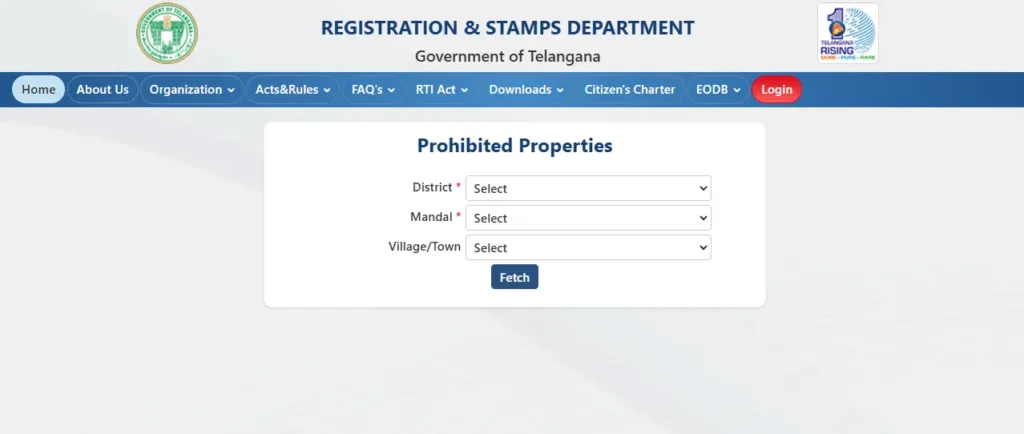
However, within Bhu Bharati’s transactional engine, an automated validation script named checkprohibited checks survey numbers during live application attempts. If a survey number sits on the restricted list, the system halts the application with an explicit alert message:
“This survey number falls under prohibited list. Hence Mutation cannot be raised.”
Because the external search link can sometimes be under maintenance or review, buyers should always cross-verify survey numbers directly with the Mandal Revenue Office or District Collectorate registers before making financial commitments.
Obtaining Encumbrance Certificates (EC)
An Encumbrance Certificate (EC) shows the 30-year registered transaction history of a parcel, verifying whether it has any outstanding mortgages, past sale deeds, or financial claims.
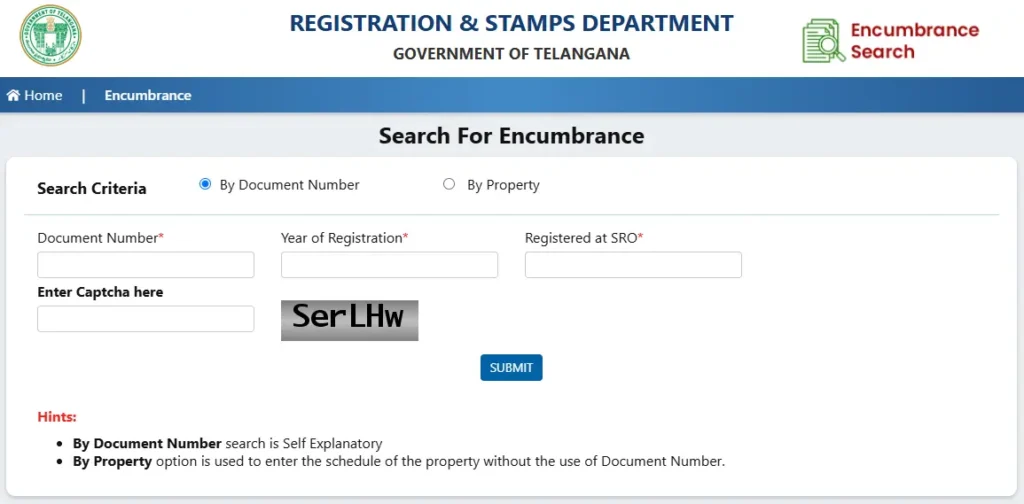
To download an EC online:
- Open Bhu Bharati or the IGRS Telangana portal (
registration.telangana.gov.in). - Click on Land Details Search or Encumbrance Details.
- Enter your District, Mandal, Village, and Survey Number (or registered document number and year).
- View and download the digital EC report to confirm the land is clear of third-party bank liens.
Step-by-Step Online Citizen Application Services
Bhu Bharati Portal Signup & Citizen Login
While viewing public land status is open to everyone, submitting official applications (such as mutations, legal successions, or NALA conversions) requires citizen login.
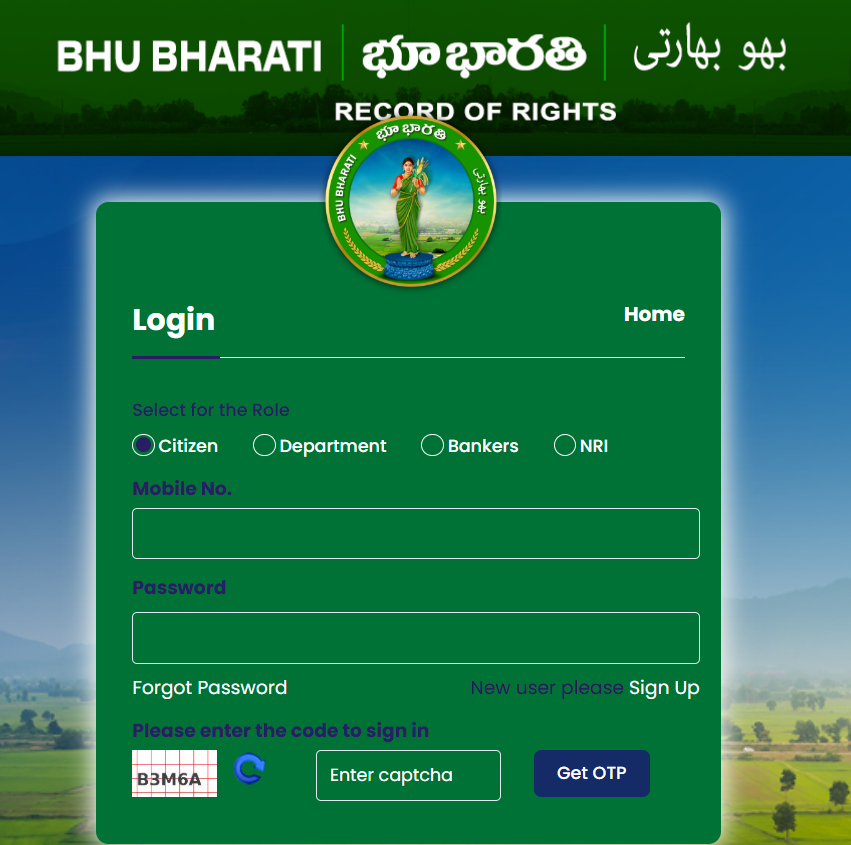
- Visit
bhubharati.telangana.gov.inand click Sign Up or Login. - Enter your full name, Aadhaar-linked mobile number, and password.
- Enter the 15-minute OTP sent to your registered mobile phone to authenticate.
- Access your Citizen Dashboard to file applications, pay e-Challans, and track progress.
Applying for Succession (Legal Heir Transfer)
When a registered landowner passes away, the legal heirs must apply for mutation under Section 7 of the Act to transfer the title in revenue records.
- Start Application: Log in, navigate to Mutation Modules, and choose Application for Succession.
- Fetch Property: Locate the parcel using the passbook number or by selecting District, Mandal, Village, Khata, and Survey Number.
- Enter Heir Details: Input the date of death and add the names, Aadhaar numbers, and relationship details of all legal heirs.
- Generate Joint Agreement: The system automatically generates a Joint Agreement of Legal Heirs form. Download, print, and collect signatures or thumb impressions from all consenting heirs.
- Upload Required Documents:
- Death Certificate of the deceased owner
- Legal Heir Certificate or Succession Certificate
- Signed Joint Agreement of Legal Heirs
- Original Pattadar Passbook and Aadhaar cards of all legal heirs
- Payment & Slot Booking: Pay the processing fee online via e-Challan, select an appointment slot at the jurisdictional Tahsildar office, and submit.
Applying for Pending Mutations & NALA Conversions
- Pending Mutations (Section 5): If you bought land via a registered sale deed but the title update was never reflected in the revenue records, navigate to the Mutation tab and click Application for Pending Mutation. Enter the sale deed document number, SRO details, and passbook number, pay the fee, and verify via MeeSeva.
- NALA Conversions: Landowners wanting to convert agricultural land for non-agricultural use (residential layouts, commercial hubs, or industrial units) can apply through the NALA Module. The system checks parcel eligibility, calculates conversion fees based on market value, and routes the file to the Revenue Divisional Officer (RDO) for sanction.
Correcting Errors, Appeals & Disputes Under Bhu Bharati
Fixing Dharani-Era Migrated Errors
When Dharani was shut down and Bhu Bharati launched in April 2025, legacy records were transferred directly into the new platform. Consequently, Dharani-era errors—such as misspelled names, wrong survey numbers, mismatched acreage, and erroneous Section 22A tagging—carried straight into Bhu Bharati.
Under Sections 4(5) and 4(6) of the Act, the government provided a one-year express administrative correction window starting on April 14, 2025. This window officially closed on April 13, 2026. Because the express window has closed, uncorrected entries are treated as final for the current survey cycle. Correcting a record discrepancy now requires following the statutory appeal ladder or approaching the Land Tribunal.
The Revenue Appeal Hierarchy & Land Tribunals
Unlike the rigid Dharani framework, Bhu Bharati establishes a multi-tiered administrative appeal hierarchy:
- Tahsildar Level: The frontline authority for local record checks and simple mutations.
- Valuation Rule: For land parcels valued above ₹5 Lakh, corrections cannot be executed by the Tahsildar alone and require formal authorization from the District Collector.
- Revenue Divisional Officer (RDO) Level: Under Section 8 of the Act, the RDO conducts summary inquiries into complex title issues—including plain-paper sales (Sada Bainama), double registrations, Inam land occupancy rights, and contested successions. Appeals against Tahsildar decisions must be submitted to the RDO within 30 days.
- District Collector & Land Tribunals: Under Section 14 of the Act, specialized Land Tribunals act as statutory judicial bodies. Appeals against RDO orders lie with the District Collector or the Land Tribunal within 30 days.
- Free Legal Aid Provision: Under Section 15(8) of the Act and Rule R.16 of the Bhu Bharati Rules, 2025, the state mandates free legal assistance to small farmers, Scheduled Castes, Scheduled Tribes, and women contesting land appeals before the Tribunal.
Practical Due-Diligence Checklist for Buyers & Owners
If you own land or plan to purchase a plot in Telangana, keep this practical due-diligence checklist handy:
- Inspect Your Online Status: Search your survey number on
bhubharati.telangana.gov.inunder Know Your Land Status. - Cross-Check Textual Fields: Compare the online ROR-1B extract against your registered sale deed, old passbook, and tax receipts. Check owner name spelling, Khata number, survey/sub-division number, and exact acreage.
- Verify Land Classification: Confirm that private land is listed as “Patta” and not misclassified as “Prohibited,” “Sarkari,” or “Assigned”.
- Check the Enjoyment Column: Ensure the actual occupant column lists your name or authorized tenant, protecting you against adverse possession claims.
- Verify Section 22A Status: Ensure the survey number is completely free of Section 22A restrictions before paying token advances.
- Pull a 30-Year Encumbrance Certificate: Download a fresh EC from IGRS Telangana to confirm there are no hidden bank mortgages or court attachments.
- Keep Dated Screenshots: Always save dated PDF copies or screenshots of your portal records for future legal evidence.
Frequently Asked Questions (FAQs)
Is the Dharani portal still working in Telangana?
No. The Dharani portal has been replaced by the official Bhu Bharati portal (bhubharati.telangana.gov.in) under the Telangana Bhu Bharati Act, 2025 (Act No. 1 of 2025).
What is the main difference between ROR-1B and Pahani?
The ROR-1B is the legal title extract that confirms ownership, Khata number, total area, and bank loan encumbrances. The Pahani (Adangal) is the annual revenue record detailing wet/dry land classification, crop cultivation, and physical possession.
What is a Bhudhaar ID?
A Bhudhaar is a unique 11- or 12-digit parcel identification number assigned to land holdings in Telangana, similar to an Aadhaar card for land. A Temporary Bhudhaar is issued before full field mapping, while a Permanent Bhudhaar is assigned after GPS survey validation.
Can I search Bhu Bharati land records by owner name?
No. The public Land Details Search on Bhu Bharati requires a specific parcel identifier—such as a Survey Number, Khata Number, Pattadar Passbook Number, or Aadhaar/Passport number.
What should I do if my private patta land is wrongly listed under Section 22A?
You must submit a grievance application through the Bhu Bharati ROR Corrections module or at your Mandal Revenue Office, attached with historical sale deeds and past revenue passbooks. The file is reviewed by the District Collector to remove the property from the prohibited register.
Has the administrative deadline for Bhu Bharati land record corrections passed?
Yes. The express one-year administrative correction window under Sections 4(5) and 4(6) ran from April 14, 2025, to April 13, 2026. Corrections must now be submitted through the formal appeal ladder (RDO/Collector) or filed before the statutory Land Tribunal under Section 14.
What is NALA conversion in Telangana?
NALA (Non-Agricultural Land Assessment) conversion is the official legal process required to convert agricultural land for non-agricultural uses, such as residential housing, commercial buildings, or industrial projects. Applications are processed online via Bhu Bharati’s NALA module.